Hi! First off, I just want to say your pixel art is incredible. I absolutely love the style and how smooth the animations look—it's exactly what I needed for my game!
I bought the expanded version, but to be honest, I'm having a little trouble distinguishing exactly where some animations start and end on the sprite sheet (especially distinguishing between similar actions).
Would it be possible for you to share a simple visual guide or a list of the frame order? It would be super helpful to make sure I slice them correctly.
Sorry to bother you with this, and thanks again for creating such amazing assets!
Hi there! Thank you so much for the compliments on my work :) In the download and install instruction, a visual guide is included for the animation frames, which applies to all of the sheets. I'll add it here to this comment as well. Let me know if you have any further questions, I'm more than happy to help!
This is a great asset! I plan to use it to teach myself programming and create a functional game. I'll definitely credit you if I ever create this small game.
combining all of the options together will generate way too many assets, which is why they are currently split up. I recommend, depending on the game engine you are using, to create a layered character. alternatively if there are any specific combinations of colours you'd like to see, I'll merge these specific files for you as well.
I'm alse updating the text here on the asset pack in order to avoid any future confusion. Thank you for making me aware that it might be an issue :)

← Return to asset pack
Comments
Log in with itch.io to leave a comment.
Hi! First off, I just want to say your pixel art is incredible. I absolutely love the style and how smooth the animations look—it's exactly what I needed for my game!
I bought the expanded version, but to be honest, I'm having a little trouble distinguishing exactly where some animations start and end on the sprite sheet (especially distinguishing between similar actions).
Would it be possible for you to share a simple visual guide or a list of the frame order? It would be super helpful to make sure I slice them correctly.
Sorry to bother you with this, and thanks again for creating such amazing assets!
Hi there! Thank you so much for the compliments on my work :)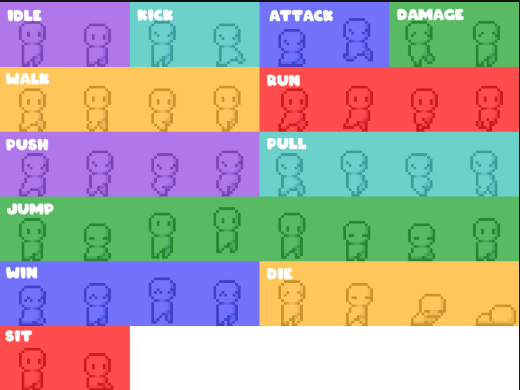
In the download and install instruction, a visual guide is included for the animation frames, which applies to all of the sheets. I'll add it here to this comment as well. Let me know if you have any further questions, I'm more than happy to help!
Love how the character is both simple and fluid. Exactly what I was looking for :)
This is a great asset! I plan to use it to teach myself programming and create a functional game. I'll definitely credit you if I ever create this small game.
I'm not planning on expanding this package with various sizes at the moment.
Could I have the spirte sheet of skin that combine pants and shirt like your art demo above ? I paid this asset but pants and shirt are separate
combining all of the options together will generate way too many assets, which is why they are currently split up. I recommend, depending on the game engine you are using, to create a layered character. alternatively if there are any specific combinations of colours you'd like to see, I'll merge these specific files for you as well.
I'm alse updating the text here on the asset pack in order to avoid any future confusion. Thank you for making me aware that it might be an issue :)
Amazing asset pack! Would be handy to label which sprites are for what animation.
Noted, thank you for the input :)
Great set! Can you add a Dash, Wall grab, Swim idle, Swim left/right, Spawn, Double-jump sprite, Duck/Crouch, Magic/Spell cast pose, Status Afflicted, Sleeping frames, Petting poses, Watering poses, Smithing poses, Attach Charge-up, Attack Charge Release? From top-down perspective.
lol this must be a troll. If you want someone to do all that work ask for a commission