I have a question regarding the contents of this asset. The example images show a specific item (I have attached a screenshot of it), but I cannot find it in the downloaded folder. Could you please let me know if this item is actually included and where I can find it? Thank you!
Thank you for making me aware of this. I've been over the files and found a couple of more icons that was not added either. All of them have been uploaded to the updated download file :)
Hi there. I'll be happy to assist with anything I can. You mention setup with the sprite sheet, but the asset pack mainly consists of individual sprites. Can you be a bit more specific about the issue you are having?
Honestly I'm just feeling a little bit dense, I've been trying to set it up like shown in the images but tried using an isometric sprite sheet in unity, the tiles keep overlapping and are different sizes etc, do you think it's better just to construct it externally (as in manually drop them?)
Yes; these are assets I made for another project, and ended up releasing here. That means that they are not optimized for a grid etc., but rather made to be placed manually. I recommend using the promotional martial as a guide of how they can be used. I also recommend making the background the same color as the wanted grass, then placing background tiles (splitting these up in tiles within the engine, but placing them manually), adding grass tiles overlays on top, and then grass blades and grass décor items as wanted.
I used parts of this assetpack for my horse-themed Minesweeper "Manesweeper". It's far from the intended use, but it was just such a great fit :D https://inglorious-inge.itch.io/manesweeper
Hey! Thanks so much for the assets, your art style is beautiful and I really enjoy your packs.
I purchased the bundle including this garden game pack and I have a question regarding the grass tile sets. I was expecting to be able to have a flat plain grass tile without borders or overlays that I could place as a base and I'm not seeing that. For example in this screenshot, the outlined red section, just a plain section of grass that I could use to surround the area before adding more overlay details. I know this picture you included is just a mockup but I am confused how to construct the surrounding grass tiles with just the overlays you provided me. I see the dirt tilesheet and I love that! Was looking for something similar with the grass and I'm just confused how to construct an environment as pictured in your examples with the files provided.
Hi there. This is actually an old pack that I released after it had been laying in my folders for a few years. It was originally set up just for my personal use. I originally set it up in unity, coloring the background the same color as the grass, and then overlaying the different assets, rather than having top fill out the back with multiple "blank" tiles. I've noted the comment, thank you for the feedback :)
These are some older assets I released after the fact, so I don't entirely remember how I set them up originally. The tiles are made to overlap, and I believe I set them up with pivot points snapping to a grid. I made an example of where to place the pivot points, and how they should overlap. When cut to 800x800px tiles, this pivot point is 438px in from the left, 360 up from the bottom, so if you do this to all four tiles whey will snap to a corresponding grid, though I do originally intend to just set up the tiles in the pattern depicted in the example gif. Hope this helps :)

← Return to asset pack
Comments
Log in with itch.io to leave a comment.
I have a question regarding the contents of this asset. The example images show a specific item (I have attached a screenshot of it), but I cannot find it in the downloaded folder. Could you please let me know if this item is actually included and where I can find it? Thank you!
Thank you for making me aware of this. I've been over the files and found a couple of more icons that was not added either. All of them have been uploaded to the updated download file :)
hey I'm struggling to set this up! is there any support on what to do :)
I don't know if i'm being silly but i'm struggling to get the assets on unity (setup with the spritesheet is the issue)
Hi there. I'll be happy to assist with anything I can. You mention setup with the sprite sheet, but the asset pack mainly consists of individual sprites. Can you be a bit more specific about the issue you are having?
Honestly I'm just feeling a little bit dense, I've been trying to set it up like shown in the images but tried using an isometric sprite sheet in unity, the tiles keep overlapping and are different sizes etc, do you think it's better just to construct it externally (as in manually drop them?)
Thanks for the reply btw!
Yes; these are assets I made for another project, and ended up releasing here. That means that they are not optimized for a grid etc., but rather made to be placed manually. I recommend using the promotional martial as a guide of how they can be used. I also recommend making the background the same color as the wanted grass, then placing background tiles (splitting these up in tiles within the engine, but placing them manually), adding grass tiles overlays on top, and then grass blades and grass décor items as wanted.
I used parts of this assetpack for my horse-themed Minesweeper "Manesweeper". It's far from the intended use, but it was just such a great fit :D
https://inglorious-inge.itch.io/manesweeper
Hey! Thanks so much for the assets, your art style is beautiful and I really enjoy your packs.
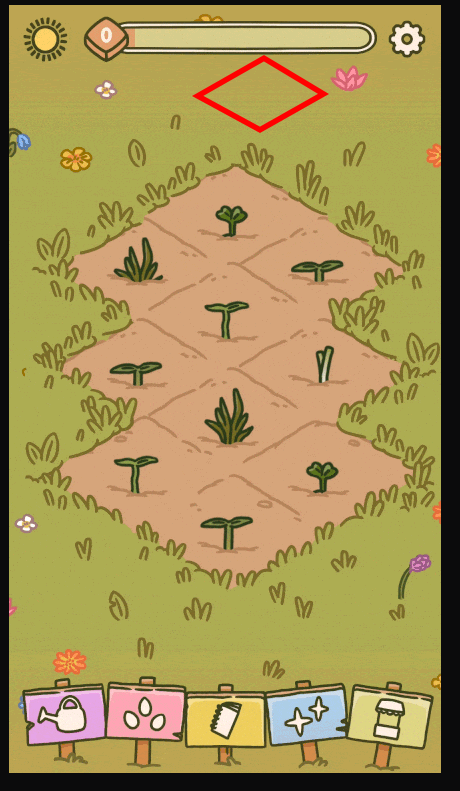
I purchased the bundle including this garden game pack and I have a question regarding the grass tile sets. I was expecting to be able to have a flat plain grass tile without borders or overlays that I could place as a base and I'm not seeing that. For example in this screenshot, the outlined red section, just a plain section of grass that I could use to surround the area before adding more overlay details.
I know this picture you included is just a mockup but I am confused how to construct the surrounding grass tiles with just the overlays you provided me. I see the dirt tilesheet and I love that! Was looking for something similar with the grass and I'm just confused how to construct an environment as pictured in your examples with the files provided.
thank you!
Hi there.
This is actually an old pack that I released after it had been laying in my folders for a few years. It was originally set up just for my personal use. I originally set it up in unity, coloring the background the same color as the grass, and then overlaying the different assets, rather than having top fill out the back with multiple "blank" tiles.
I've noted the comment, thank you for the feedback :)
i see. okay, thanks for the reply.
what tile/grid size are these assets using? couldn't figure it out myself...
These are some older assets I released after the fact, so I don't entirely remember how I set them up originally. The tiles are made to overlap, and I believe I set them up with pivot points snapping to a grid. I made an example of where to place the pivot points, and how they should overlap. When cut to 800x800px tiles, this pivot point is 438px in from the left, 360 up from the bottom, so if you do this to all four tiles whey will snap to a corresponding grid, though I do originally intend to just set up the tiles in the pattern depicted in the example gif. Hope this helps :)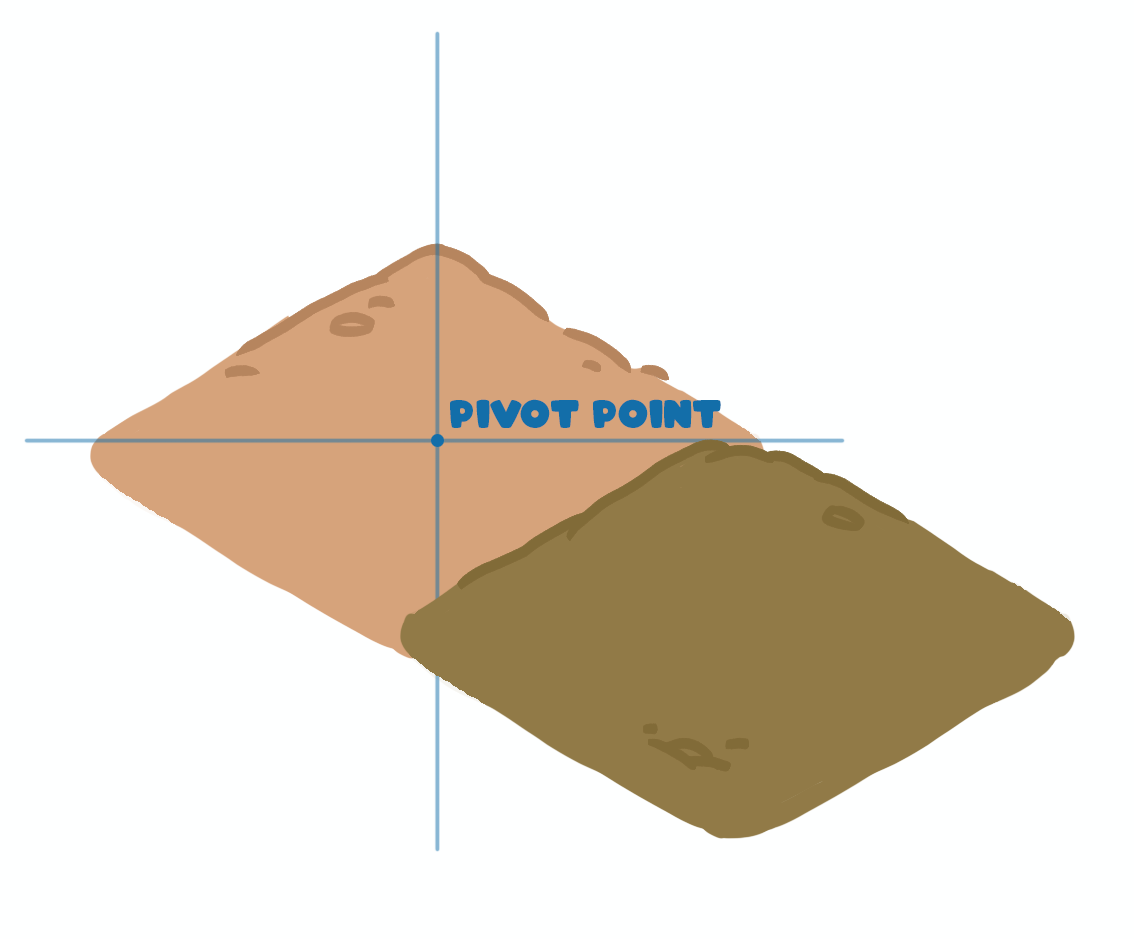
I'd love to get all the fruits and veggies that are on the seed packs.
Are you going to make more plants for this pack?
I don't have any plans to do so at the moment. If the pack gains enough momentum, or if it gets requested from my patreon, I might do so :)